OpenGL vs DirectX Normal Maps: A 5-Engine Cheat Sheet
Choose the correct tangent-space normal convention and diagnose an inverted green channel in Blender, Unity, Unreal, Godot, and glTF.
Quick answer
OpenGL-style normal maps use a positive Y convention, while DirectX-style maps store the opposite Y direction in the green channel. Convert between them with G′ = 255 − G for 8-bit data. Confirm the target importer is doing the flip exactly once, then verify the result under a moving light.
Which convention should I export?
| Target | Starting convention | Import as | Check |
|---|---|---|---|
| Blender tangent-space Normal Map node | Y+ | Non-Color | Normal Map node feeds Normal |
| Unity Standard, URP or HDRP | Y+ | Normal map | Flip Green Channel only for a Y− file |
| Unreal Engine | Y− | Normalmap compression | Flip Green Channel only for a Y+ file |
| Godot StandardMaterial3D | Y+ | Normal texture | Inspect import processing on migrated assets |
| glTF 2.0 | Y+ | Linear normalTexture data | Check inside the receiving viewer |
A graphics API label does not establish what a shader expects. A Unity project running on Direct3D can import the same Y+ tangent normal as its Vulkan build. The asset importer, tangent basis and material determine how the texture is read.
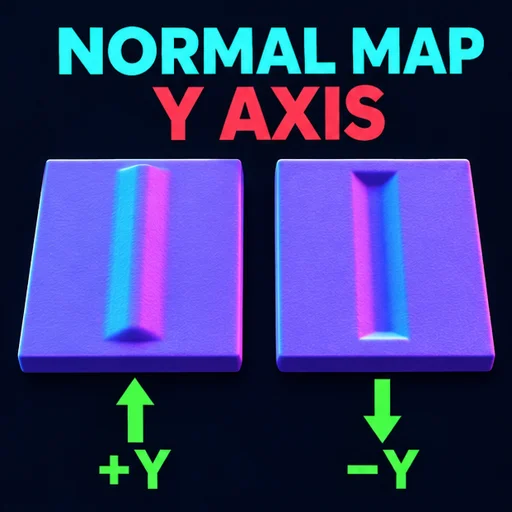
How can I verify the green channel?
- Check a known flat region. An 8-bit tangent normal pointing along +Z is close to (128, 128, 255).
- Copy the asset and flip only green. Keep red, blue, alpha and dimensions identical.
- Apply both copies to the same plane under a directional light. Compare a known raised edge first.
- Rotate the light along the bitangent. If the expected raised edge looks recessed on only one copy, keep the copy with the correct response.
For a concrete byte check, (128, 200, 233, 255) becomes (128, 55, 233, 255). Neutral green 128 becomes 127 because the range has two middle values. Applying the conversion twice reproduces the original pixels. If only mirrored UV islands show bad shading, check tangents and the bake before changing the whole texture.
Why do both versions still look wrong?
Start with color handling. The color-looking purple image encodes data and should use the destination's normal importer or non-color mode. Then confirm the asset is an RGB tangent normal. A two-channel compressed normal needs its decoder to reconstruct Z. Finally, compare the tangent basis, UV seams and mesh triangulation between bake and render. Green inversion can fix a Y mismatch across the image. A tangent mismatch can place a visible seam only on a subset of faces.
Open the free browser tool to run the conversion with your own texture.
Frequently asked questions
Can I automatically detect OpenGL versus DirectX from a PNG?
A standalone PNG generally has no reliable convention identifier. Check the export preset or compare it to a known geometric feature under light. File suffixes can be useful when your own export pipeline enforces them.
Does flipping green change the mesh?
The edit changes how shading reads directions from the texture. The mesh silhouette and UV layout stay the same. A reversed image row order would move pixels and is a different operation.